
SermonSpeaker Update 6 to 7 Help
- Thomas Hunziker
-
- Offline
- Administrator
-

Less
More
12 Dec 2025 13:29 #8491
by Thomas Hunziker
Replied by Thomas Hunziker on topic SermonSpeaker Update 6 to 7 Help
Can you try this version?
Please Log in or Create an account to join the conversation.
- Brian Howell
-
 Topic Author
- Offline
- New Member
-

Less
More
- Posts: 13
- Thank you received: 0
12 Dec 2025 22:56 - 12 Dec 2025 23:14 #8494
by Brian Howell
Replied by Brian Howell on topic SermonSpeaker Update 6 to 7 Help
Thank you for the updated file. On the plus side, I don't see any errors. On the minus side, I don't see any sermons.
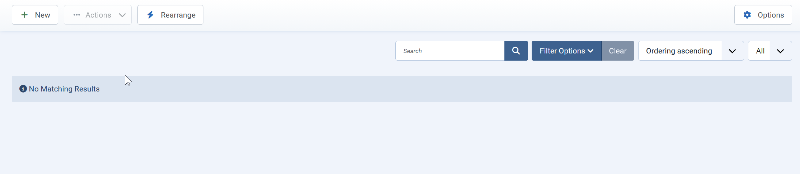
When I go to the page on the website where the sermons should be I see this.
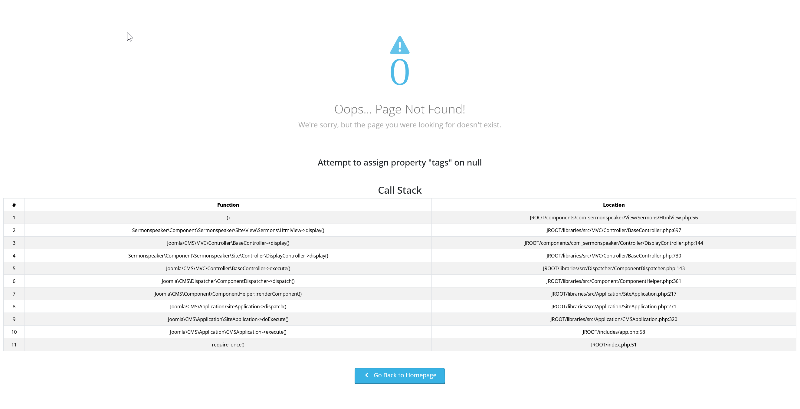
The screenshot isn't clear on my end. Hopefully you can see it full size on your side.
Here is the textOops...
Page Not Found!We're sorry, but the page you were looking for doesn't exist.
Attempt to assign property "tags" on null
Call Stack#FunctionLocation
1()JROOT/components/com_sermonspeaker/View/Sermons/HtmlView.php:56
2Sermonspeaker\Component\Sermonspeaker\Site\View\Sermons\HtmlView->display()JROOT/libraries/src/MVC/Controller/BaseController.php:697
3Joomla\CMS\MVC\Controller\BaseController->display()JROOT/components/com_sermonspeaker/Controller/DisplayController.php:144
4Sermonspeaker\Component\Sermonspeaker\Site\Controller\DisplayController->display()JROOT/libraries/src/MVC/Controller/BaseController.php:730
5Joomla\CMS\MVC\Controller\BaseController->execute()JROOT/libraries/src/Dispatcher/ComponentDispatcher.php:143
6Joomla\CMS\Dispatcher\ComponentDispatcher->dispatch()JROOT/libraries/src/Component/ComponentHelper.php:361
7Joomla\CMS\Component\ComponentHelper::renderComponent()JROOT/libraries/src/Application/SiteApplication.php:217
8Joomla\CMS\Application\SiteApplication->dispatch()JROOT/libraries/src/Application/SiteApplication.php:271
9Joomla\CMS\Application\SiteApplication->doExecute()JROOT/libraries/src/Application/CMSApplication.php:320
10Joomla\CMS\Application\CMSApplication->execute()JROOT/includes/app.php:58
11require_once()JROOT/index.php:51
When I go to the page on the website where the sermons should be I see this.
The screenshot isn't clear on my end. Hopefully you can see it full size on your side.
Here is the textOops...
Page Not Found!We're sorry, but the page you were looking for doesn't exist.
Attempt to assign property "tags" on null
Call Stack#FunctionLocation
1()JROOT/components/com_sermonspeaker/View/Sermons/HtmlView.php:56
2Sermonspeaker\Component\Sermonspeaker\Site\View\Sermons\HtmlView->display()JROOT/libraries/src/MVC/Controller/BaseController.php:697
3Joomla\CMS\MVC\Controller\BaseController->display()JROOT/components/com_sermonspeaker/Controller/DisplayController.php:144
4Sermonspeaker\Component\Sermonspeaker\Site\Controller\DisplayController->display()JROOT/libraries/src/MVC/Controller/BaseController.php:730
5Joomla\CMS\MVC\Controller\BaseController->execute()JROOT/libraries/src/Dispatcher/ComponentDispatcher.php:143
6Joomla\CMS\Dispatcher\ComponentDispatcher->dispatch()JROOT/libraries/src/Component/ComponentHelper.php:361
7Joomla\CMS\Component\ComponentHelper::renderComponent()JROOT/libraries/src/Application/SiteApplication.php:217
8Joomla\CMS\Application\SiteApplication->dispatch()JROOT/libraries/src/Application/SiteApplication.php:271
9Joomla\CMS\Application\SiteApplication->doExecute()JROOT/libraries/src/Application/CMSApplication.php:320
10Joomla\CMS\Application\CMSApplication->execute()JROOT/includes/app.php:58
11require_once()JROOT/index.php:51
Last edit: 12 Dec 2025 23:14 by Brian Howell.
Please Log in or Create an account to join the conversation.
- Thomas Hunziker
-
- Offline
- Administrator
-
12 Dec 2025 23:11 #8495
by Thomas Hunziker
Replied by Thomas Hunziker on topic SermonSpeaker Update 6 to 7 Help
Yeah, now the priority should be to get the sermons in the backend. The frontend probably solves itself then.
Do you see the sermon entries in a database tool like phpMyAdmin? They should be in the table #__sermon_sermons (replace #_ with your Joomla database prefix).
You can also check if the column "catid" matches an id in the #__categories" table from Joomla. And if not adjust it to the "Uncategorized" Sermonspeaker sermons category. I think it shouldn't matter, but may be worth a shot.
Do you see the sermon entries in a database tool like phpMyAdmin? They should be in the table #__sermon_sermons (replace #_ with your Joomla database prefix).
You can also check if the column "catid" matches an id in the #__categories" table from Joomla. And if not adjust it to the "Uncategorized" Sermonspeaker sermons category. I think it shouldn't matter, but may be worth a shot.
Please Log in or Create an account to join the conversation.
- Thomas Hunziker
-
- Offline
- Administrator
-
13 Dec 2025 15:12 #8496
by Thomas Hunziker
Replied by Thomas Hunziker on topic SermonSpeaker Update 6 to 7 Help
I you want, you can send me account details for a super user account and if possible also access to phpMyAdmin (or a similar tool). Then I can have a look myself and figure out what is wrong.
You can use the contact form or send it directly to admin@sermonspeaker.net.
You can use the contact form or send it directly to admin@sermonspeaker.net.
Please Log in or Create an account to join the conversation.
- Brian Howell
-
Topic Author
- Offline
- New Member
-
Less
More
- Posts: 13
- Thank you received: 0
14 Dec 2025 00:16 - 14 Dec 2025 02:42 #8497
by Brian Howell
Replied by Brian Howell on topic SermonSpeaker Update 6 to 7 Help
You May be on to something. I looked at the CatID Column in the Sermon Table of the live DB that I restored from the backup and the number is "43"
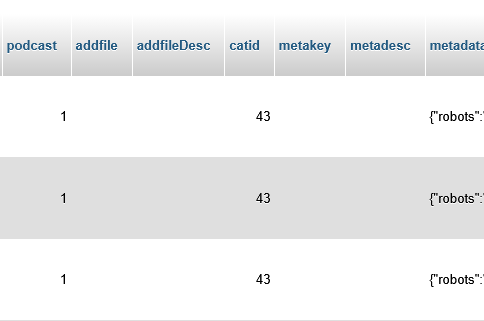
I looked at the Category Table in the backup DB and it shows this:

I looked at the live DB Category Table and it shows this:

There is no more "43"
I'll have to change the ID in the Category Table to match that in the orig. DB table
I changed one to test, the first one in the DB from"43" to "50" and checked the back end, nothing showed
It seems that didn't work the CatID's changed, so the the Asset_ID and those numbers associated with the orig. SermonSpeaker install are gone too. . .
I copied over the Category and Asset_ID tables from the backup so they match the copied SermonSpeaker tables, still no sermons showing in the Backend. When I click on "Sermons, Series, Speakers Categories" menu items I get the following at the very top of the screen on the Backend:
Warning: Attempt to read property "alledia" on false in /home1/aikensda/public_html/libraries/allediaframework/Framework/Joomla/Extension/Generic.php on line 452
So to sum up thus far; I've copied the DB tables from the backup for Joomla Categories and Asset_ID to go with the copied tables from the old SermonSpeaker install. All of those tables should match what the old V6 Sermon Speaker was but still no sermons showing up in the backend. I'll keep fiddling with it.
I've noticed in the SermonSpeaker Options the sources are set to the Images folder. Where are these options stored in the DB tables? Our sermons are stored in /public_html/Sermon_MP3s
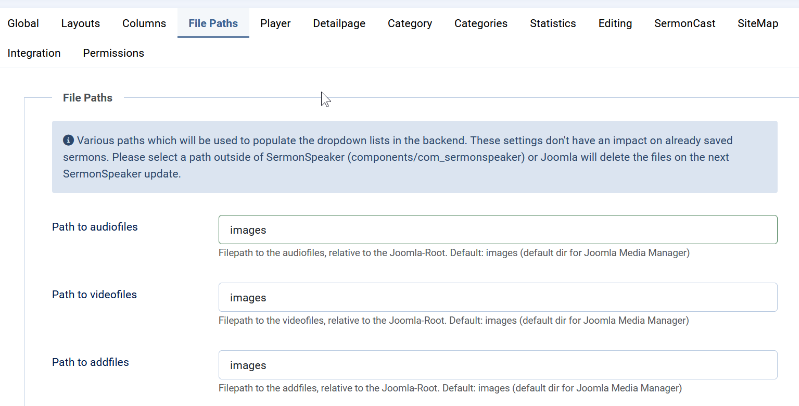
I changed "images" to "Sermon_MP3s" as well as the full dir. path but still no list of sermons.
I looked at the Category Table in the backup DB and it shows this:
I looked at the live DB Category Table and it shows this:
There is no more "43"
I'll have to change the ID in the Category Table to match that in the orig. DB table
I changed one to test, the first one in the DB from"43" to "50" and checked the back end, nothing showed
It seems that didn't work the CatID's changed, so the the Asset_ID and those numbers associated with the orig. SermonSpeaker install are gone too. . .
I copied over the Category and Asset_ID tables from the backup so they match the copied SermonSpeaker tables, still no sermons showing in the Backend. When I click on "Sermons, Series, Speakers Categories" menu items I get the following at the very top of the screen on the Backend:
Warning: Attempt to read property "alledia" on false in /home1/aikensda/public_html/libraries/allediaframework/Framework/Joomla/Extension/Generic.php on line 452
So to sum up thus far; I've copied the DB tables from the backup for Joomla Categories and Asset_ID to go with the copied tables from the old SermonSpeaker install. All of those tables should match what the old V6 Sermon Speaker was but still no sermons showing up in the backend. I'll keep fiddling with it.
I've noticed in the SermonSpeaker Options the sources are set to the Images folder. Where are these options stored in the DB tables? Our sermons are stored in /public_html/Sermon_MP3s
I changed "images" to "Sermon_MP3s" as well as the full dir. path but still no list of sermons.
Last edit: 14 Dec 2025 02:42 by Brian Howell.
Please Log in or Create an account to join the conversation.
Time to create page: 0.240 seconds